The AI CFO That Lives in Your Office
Faraday Local began as private search over a company’s files. Now it watches the books: it re-checks every payment the moment a file arrives, keeps the year’s forecast current and grades its own accuracy, and gives everyone on the team instant answers with the source attached, each from the spaces shared with them. All of it runs on a Mac in your office. Here it is on a fictional sample company.
Key takeaways
- Faraday Local gives a growing business an always-on finance desk that runs on a Mac in its own office: the model, the search index and the records database never leave the building.
- It re-runs 17 kinds of checks whenever files or records change, catching possible double payments, reused invoice numbers and sales tax that matches no Canadian rate within seconds of a statement arriving.
- Its forecast grades itself: each month it predicts the last three months using only earlier data and shows the average error next to the forecast, so the team can see how far to trust it.
- In Faraday’s own tests on a library of 50,000 records and 3,000 files, the Insights page opened in 5–8 milliseconds from stored results, against about 2.6 seconds to recalculate.
- Four spaces, Financial data, Policies, Contracts, and Payroll and HR, let a whole team sign in and get answers drawn only from the folders shared with each person.
From a Search Box to a Finance Desk
Faraday Local started as private search: point it at a folder of invoices, receipts, bank statements and spreadsheets, and ask questions in plain English. A model running on the Mac plans each question, the records database does the arithmetic, and every answer links back to the rows and pages it came from.
Now it does more than answer. It watches the books. Every file that lands in a watched folder is read, its payments are extracted and categorised, and the whole ledger is checked again. The result is one page that shows how the year is going, where it is heading and what deserves attention today.
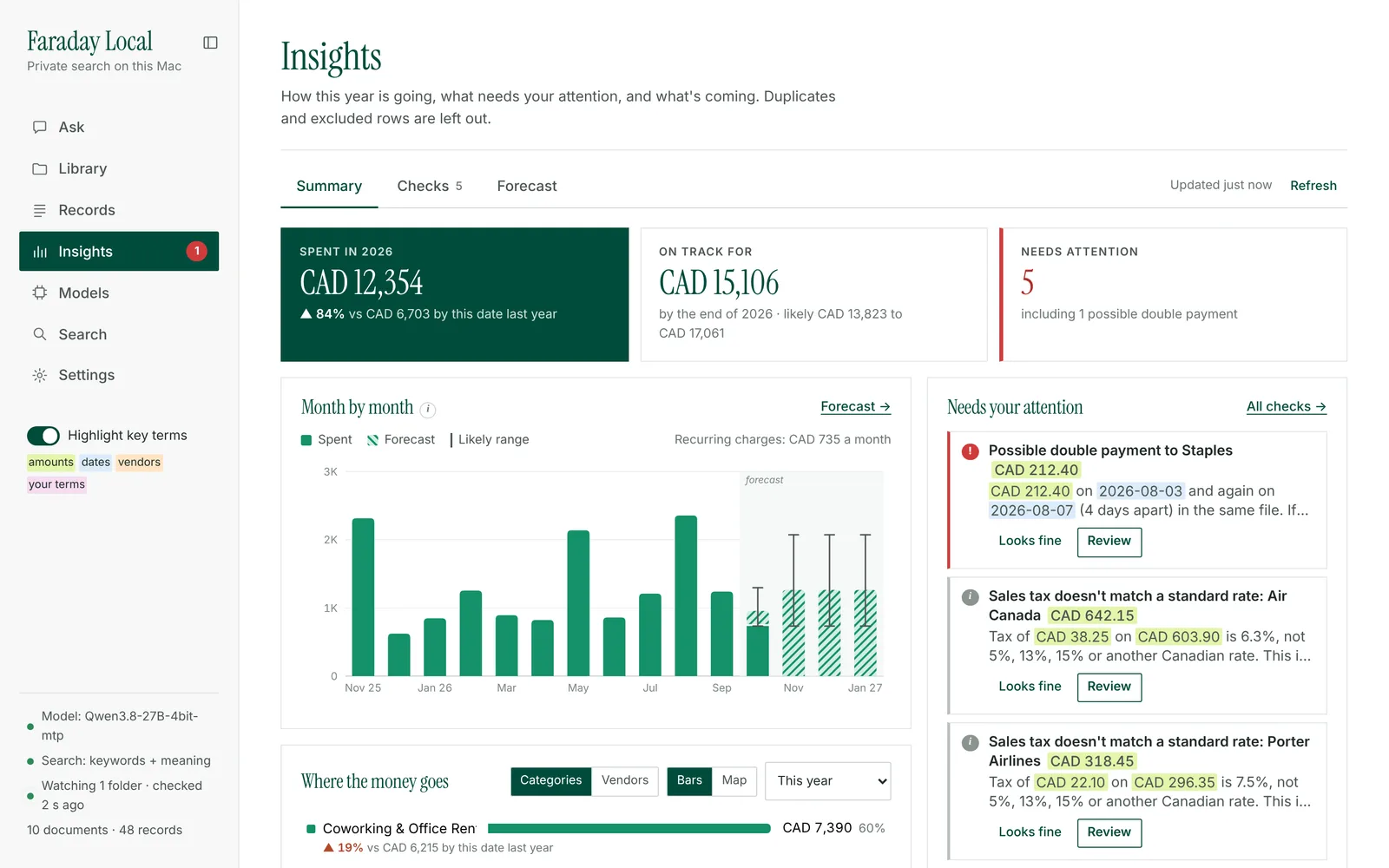
For a growing business this is the part of a finance team that is hardest to hire early: someone who reconciles, re-checks and re-forecasts every time something changes. Faraday Local does it continuously, on hardware the business owns, with no per-question bill to make anyone ration it.
A Finance Desk That Never Clocks Out
Faraday Local works on its own between the moments when people need it. It reads, calculates, flags and drafts, and brings the decisions to the right person with the evidence attached. Every number comes from the records database, and every finding links to the file and row behind it.
| The job | Faraday Local handles | Your team decides |
|---|---|---|
| Bookkeeping intake | Reads every new receipt, invoice, statement and spreadsheet in watched folders, extracts each payment and files it in a category | Correcting a category or excluding a row, which it remembers |
| Controls | Re-runs 17 checks on every change and ranks what it finds | Whether a flagged payment is a problem |
| Forecasting | Keeps the next six months and the year-end total current, and grades its own accuracy | Plans for the one-off purchases only people know about |
| Policy questions | Answers from your own policy documents, with the passage cited | What the policy says |
| Cash coming in | Forecasts income from three months of deposits or sales records | Where to grow next |
That split is what lets an owner leave it running. It does the watching and the arithmetic around the clock, and people spend their time on the calls that need judgement.
Continuous Checks: Catch It the Day It Happens
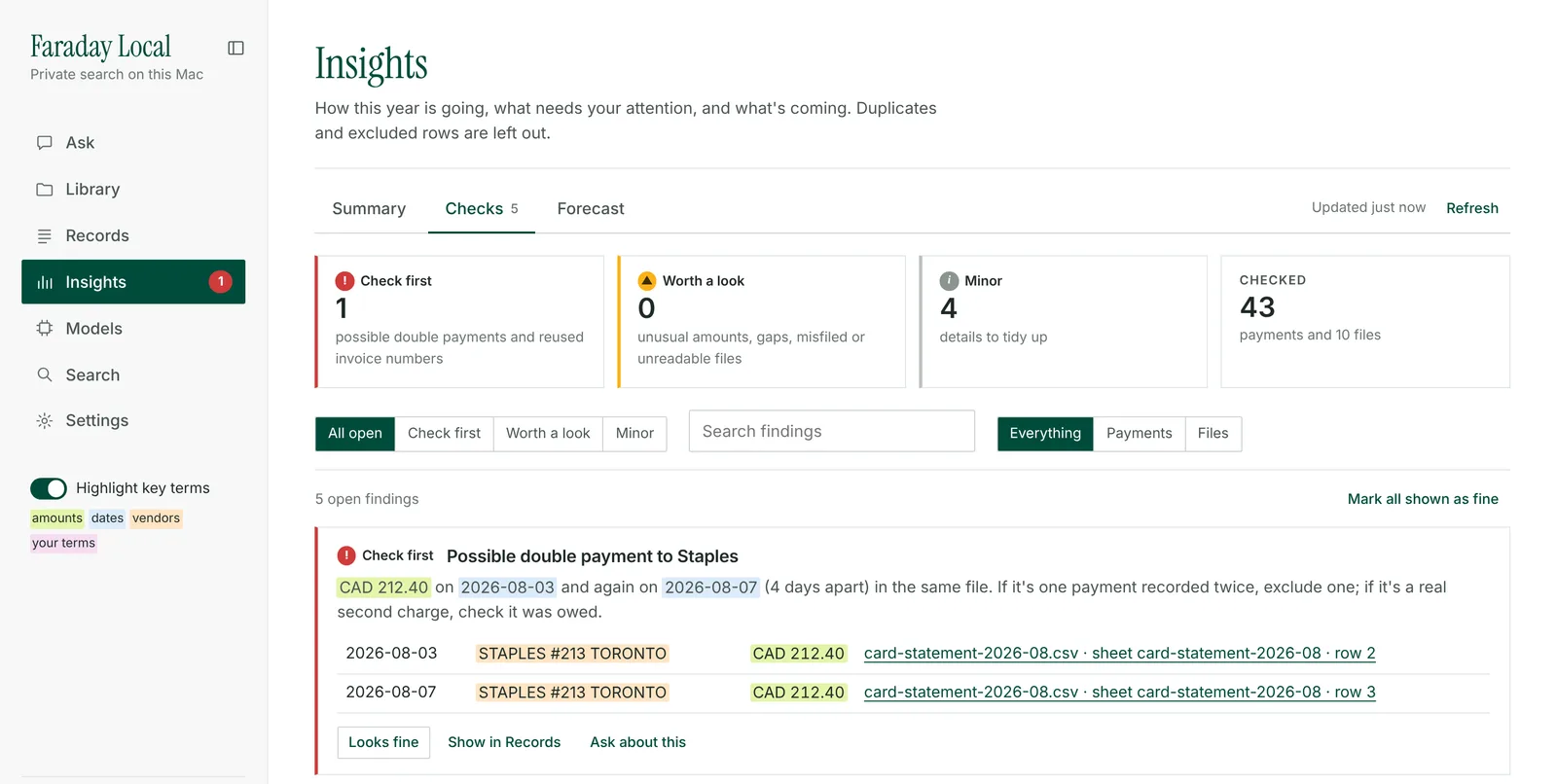
A year-end review finds a double payment months after the money has gone. Faraday Local looks again every time a file arrives. When a card statement lands with the same Staples charge on August 3 and again on August 7, the summary page shows it within seconds, with both rows and the statement they came from.
| Group | What it catches |
|---|---|
| Paying twice | The same vendor and amount within ten days; an invoice number used twice |
| Unusual amounts | Amounts far outside a vendor’s or category’s norm; large round amounts; large one-off payments to new vendors; payments with no category |
| Dates and patterns | Dates in the future or implausibly old; a monthly charge with a missing month; a recurring charge that stopped; sales tax that matches none of the combined rates used in Canada (5%, 11%, 12%, 13%, 14.975% or 15%) |
| Files | Files filed under the wrong year; files unlike the rest of their folder; file names that disagree with the document date; duplicate files; files that couldn’t be read |
Every check learns from the team. Mark a finding as fine and it is not raised again. Correct a payment’s category and the correction is applied to future payments that read the same way. Exclude a duplicate row and every total, check and forecast is recalculated without it. The more the team uses it, the sharper it gets, without anyone retraining a model.
Forecasts That Get Sharper Every Month
Most small-business forecasts are a spreadsheet someone updated once. Faraday Local re-forecasts whenever the data changes and shows exactly how good the forecast is.
The method is clear enough to explain to a board. Recurring charges, such as rent, memberships and subscriptions, are found from three payments and projected on their own schedule at their usual amount. Everything else is projected at its average over the last 12 complete months, adjusted for the time of year once there is enough history. The likely range covers eight in ten outcomes, based on how much that spending usually moves from month to month.
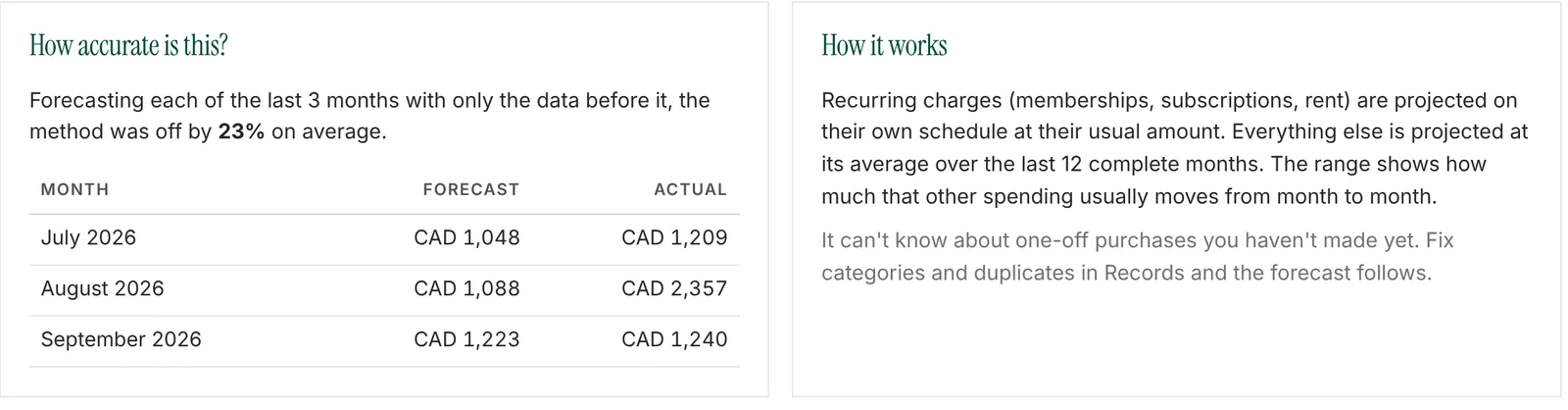
Then it grades itself. Each month it forecasts the last three complete months using only the data available before each one, compares the result with what was actually spent and reports the average error. As months of history build up, duplicates are excluded and categories are corrected, the forecast has more and cleaner data to work from, and the accuracy figure shows the progress on the same page.
For a finance lead deciding how much to trust a number, a forecast that publishes its own track record is worth more than a confident one that doesn’t.
Instant Answers for the Whole Team
The numbers are ready the moment anyone looks. Insights, Checks and the forecast are recalculated in the background whenever the data changes and stored, so the page opens with its numbers already there, even straight after a restart. In Faraday’s own tests on a library of 50,000 records and 3,000 files, the summary opened in 5–8 milliseconds from the stored result, where recalculating took about 2.6 seconds. After an edit, the page shows the previous numbers marked as updating and swaps in the new ones about 2.6 seconds later.
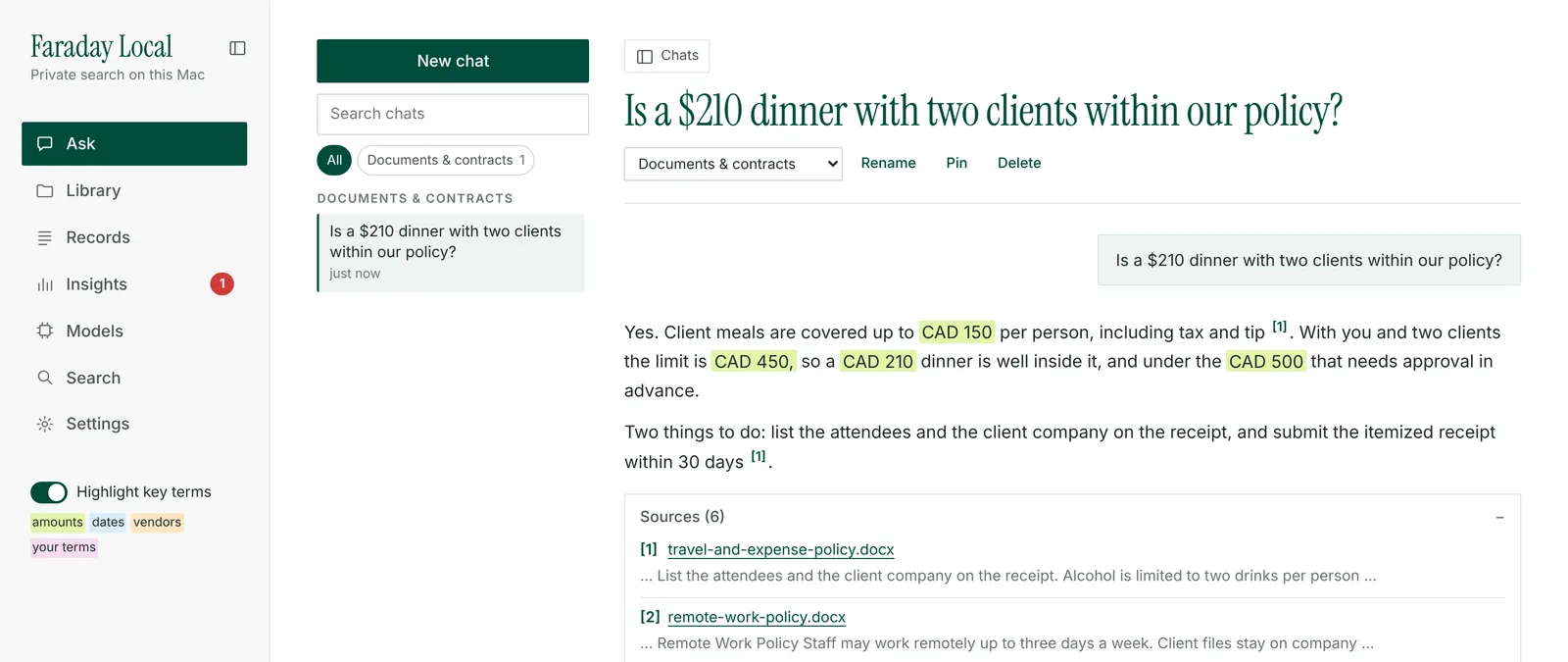
And anyone can ask. The same assistant that adds up spending answers questions about the documents around it: policies, contracts, membership agreements. Answers cite the passage they came from, so an employee checking an expense limit gets the rule and its source in one reply.
Spaces: The Right Data for Each Person
Bringing the whole team in works best when each person sees exactly what they need. Account directors read contracts but not payroll. Everyone reads the expense policy. The bookkeeper sees the bank statements. Faraday Local handles this with spaces.
Financial data: ledgers, statements, receipts and invoices, with Records, Insights, checks and the forecast. Typically the owner and the bookkeeper.
Policies: expense, travel, remote-work and security policies. Typically everyone.
Contracts: client and supplier agreements. Typically leadership and account directors.
Payroll and HR: compensation, reviews and personnel files. Typically the owner only.
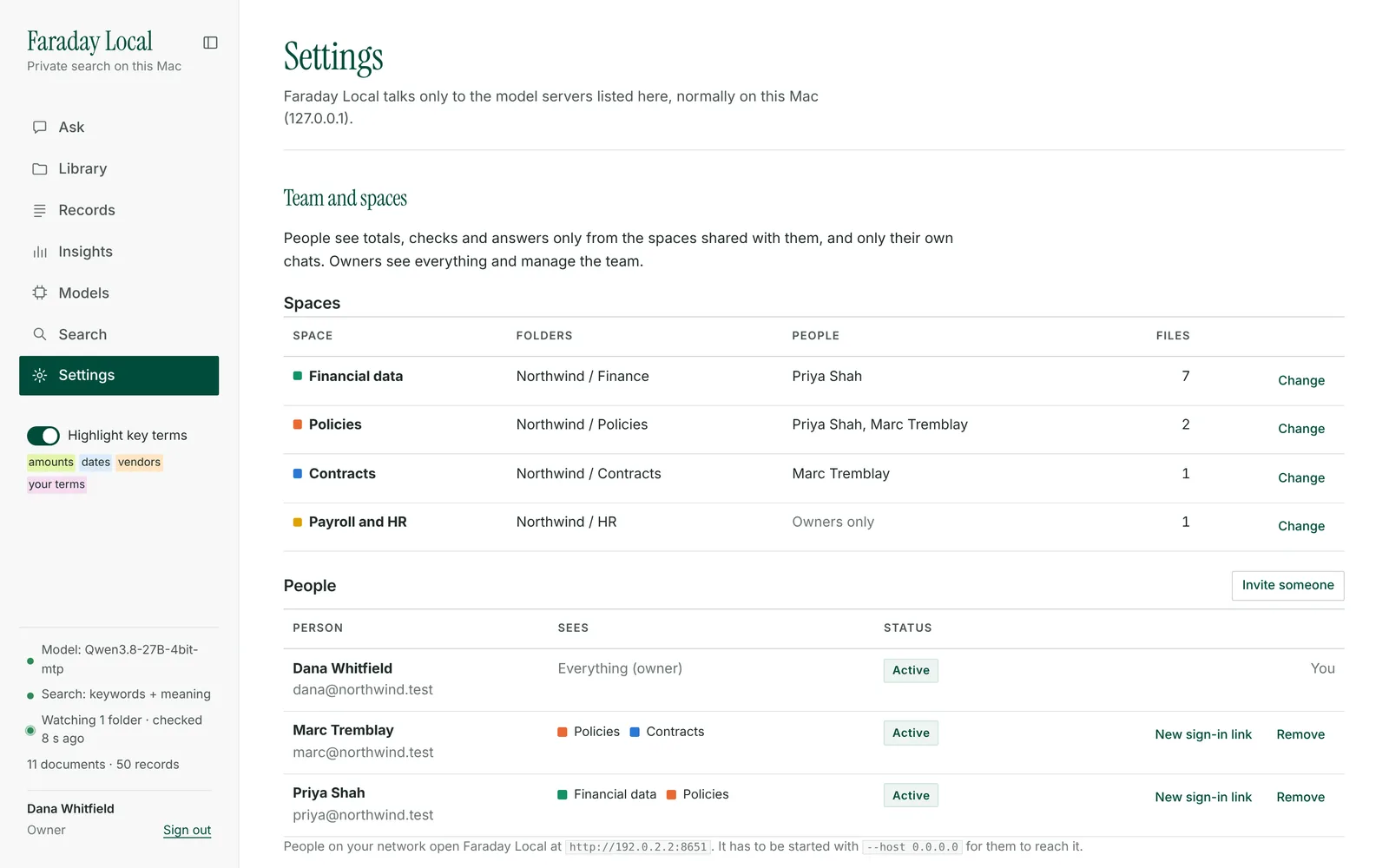
Each person signs in from their own computer and sees totals, checks and answers only from their spaces, plus their own chats. Ask about spending without access to Financial data and the reply says so and names who can share it.
The boundary sits in the database, before anything reaches the model: search, records and checks only return what is in the asking person’s spaces, so the model never sees the rest. That makes it simple to open Faraday Local to a growing team with confidence.
Built for Growing Businesses
A finance assistant earns its place by running constantly, and that is where owning the hardware pays off. Re-checking the whole ledger whenever a file arrives, and re-forecasting whenever a record changes, costs nothing extra on a machine you already own. On a metered cloud service every one of those passes is a line on a bill. We set out that argument in more detail in Dollars per Task.
It also keeps the most sensitive files a company has, its ledgers, payroll, contracts and policies, inside the building, while the whole team benefits from them. As the business grows, the folders, the history and the team grow with it, and every new month of records makes the forecast better informed.
Faraday Machines installs open-weight models on Mac Studio hardware in Toronto. Faraday Local is the finance and records assistant that runs on it. If you want to see it on your own books, talk to us.
Frequently Asked Questions
Can an AI work like a CFO for a small business?
Faraday Local takes on the work a finance lead rarely has time for: it re-checks every payment when a file arrives, keeps the year-end forecast current and answers the team’s routine questions with sources. People keep the decisions. It flags a possible double payment for someone to confirm, and suggests categories that a person can correct, which it then remembers.
How does Faraday Local find double payments?
It groups payments by vendor and exact amount, then flags any two within ten days of each other, and any invoice number used twice. Bank spellings such as STAPLES #213 TORONTO are matched to the vendor. Each finding links to the rows and files behind it, and marking one as fine stops it being flagged again.
How accurate is an AI spending forecast?
Faraday Local measures it for you. Each month it forecasts the last three complete months using only the data before each one, compares that with what you actually spent and shows the average error next to the forecast. On the fictional sample company in this article it was off by 23%, with one unusual month accounting for most of it.
Can my whole team use it without seeing payroll?
Yes. Owners set up four spaces, Financial data, Policies, Contracts, and Payroll and HR, choose the folders in each and invite people to the ones they need. Each person signs in and sees totals, checks and answers only from their spaces. Owners see everything.
Does Faraday Local send financial data to the cloud?
No. The language model, the search index and the records database all run on the Mac in your office. Files are read where they sit, including folders synced from Google Drive, Dropbox, OneDrive or iCloud, and no document text or question is sent to a cloud AI service. It keeps working with the internet off.
References
[1] Faraday Machines. (2026). Faraday Local: Insights summary, background recalculation, checks, forecast, and team access with spaces. Performance figures are from Faraday’s own tests on a generated library of 3,000 files and 50,000 records.
[2] Faraday Machines. (2026). Northwind Studio sample data set, a fictional company used for the screenshots in this article.
[3] Faraday Machines. (2026). “Dollars per Task: The New Metric That Makes the On-Premises Case.” Available at: faradaymachines.com/dollars-per-task-on-premises-ai
[4] Faraday Machines. (2026). “Your Clients’ Books Don’t Belong in a Cloud Model.” Available at: faradaymachines.com/faraday-for-accountants-and-bookkeepers
[5] Faraday Machines. (2026). “Security & Compliance First.” Available at: faradaymachines.com/security-compliance
See It on Your Own Books
Faraday Local runs on the Mac Studio systems we install, next to your files. We’ll show you the checks, the forecast and the answers on your own data, without it leaving your office.
Talk to Us